iPhone alarm clock

Wake up at your first alarm.

Wakeyo doesn't switch off until you've actually done something — a few push-ups, a photo, a puzzle. By the time it stops, you're already up.

Download on theApp Store Free to start · iOS 26.1+
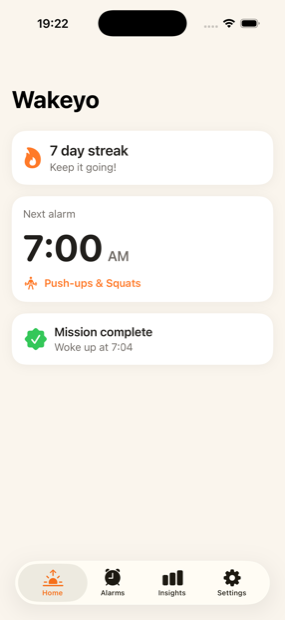
Wakeyo home screen showing a 7 day streak and the next alarm at 7:00 AM
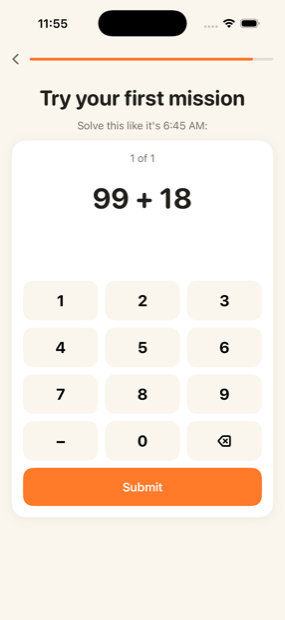
A Wakeyo math mission asking the user to solve 99 + 18 to dismiss the alarm
Rings on silentEven in Focus mode
5 missionsPick what gets you up
Stays on deviceNo account needed

Why it works

The snooze button was always going to win.

At 6:45 AM you are not making decisions — you're reaching for the nearest way back to sleep. So Wakeyo removes the one-tap escape and asks for something a half-asleep hand can't fake.

Your old alarm

  • One tap and you're back asleep
  • Snooze until you're late
  • Same failed routine tomorrow

Wakeyo

  • A mission proves you're awake
  • Backup alarms ring until you're up
  • A streak that builds every morning

Five missions

Pick the one you can't sleep through.

Different mornings need different pushes. Try a few and keep the one that actually gets you out of bed.

🏋️

Push-ups & Squats

Your camera counts the reps as you do them. No shortcuts, no tapping through.

Pro

Math Problems

Solve your way out. Simple enough to be fair, hard enough to need your brain.

Free
📳

Shake It Off

Shake the phone until the counter fills. The easiest way to get moving.

Free
🌅

Sky Photo

Point your camera at the sky. It only counts if you've left the bed.

Pro
🔍

Object Hunt

Go find something across the room and photograph it. Now you're standing.

Pro

Every morning counts

Small wins, stacked.

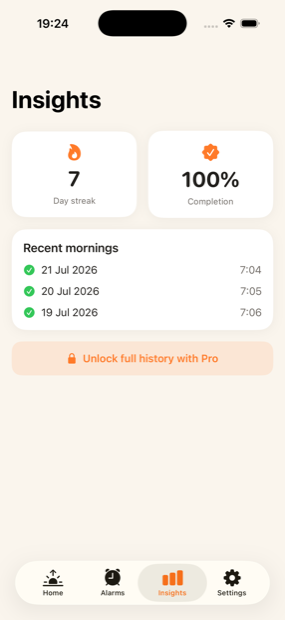
Wakeyo keeps a streak of the mornings you got up as planned, plus how often you finished the mission and what time you actually surfaced. Progress you can see beats willpower you have to summon.

Wakeyo progress screen showing a 7 day streak and 100% completion

Set it once

Different missions for different days.

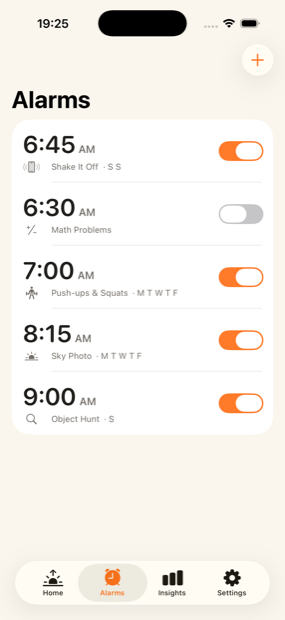
Give the gym alarm push-ups and the Sunday alarm something gentler. Each alarm keeps its own mission, its own days and its own sound.

Wakeyo alarm list with five alarms, each using a different mission

How a morning goes

Four steps, then you're up.

Set your alarm

Choose the time, the days, and which mission has to be done before it stops.

It rings anyway

Full screen, through Silent mode and Focus. There's no one-tap way out.

Do the mission

Push-ups, a puzzle, a photo. It takes under a minute — and it's the minute that wakes you.

Your streak grows

The morning is logged and the streak ticks up. Tomorrow gets a little easier.

Built to be hard to cheat

The details that decide whether you actually get up.

Rings through Silent

Wakeyo uses Apple's alarm system, so Silent mode and Focus don't mute it.

Backups that re-fire

Leave the mission unfinished and the alarm returns a few minutes later, and again after that.

Verified, not trusted

Reps are counted by the camera and photos are checked on device. Screenshots don't pass.

Your data stays put

Alarms, streaks and photos live on your iPhone. No account, no upload.

Questions

Before you download.

Will it ring if my iPhone is on silent?

Yes. Wakeyo schedules real system alarms, so it sounds through Silent mode and Focus, and takes over the Lock Screen when it fires.

What if I just ignore the mission?

Backup alarms fire a few minutes apart until the mission is finished, so going back to sleep doesn't end the alarm — finishing it does.

Is there still a snooze button?

Not the one-tap kind. Dismissing the alarm means completing the mission you chose. That's the whole point of the app, and it's worth knowing before you install it.

How do the camera missions work?

Push-ups and squats are counted using on-device pose detection, and photo missions are checked on your iPhone. Nothing is uploaded and no images leave the device.

What's free and what's Pro?

Your first alarm plus the Math and Shake missions are free, with no time limit. Pro adds unlimited alarms, the camera missions, full morning history and custom sounds — $19.99 per year with a 3-day free trial, or $34.99 once for lifetime access.

Which iPhones does it run on?

Any iPhone on iOS 26.1 or later. Wakeyo is iPhone only for now.

What languages does it speak?

English, Spanish (Spain and Latin America) and Portuguese (Brazil). You can switch language inside the app, independently of your phone's settings.

Does it track my sleep?

No. Wakeyo is about waking up at the time you chose, not about measuring your night or getting you to sleep less.
Tomorrow morning

Set one alarm and see what happens.

Free to start, no account, and your first mission takes under a minute.

Download on theApp Store